
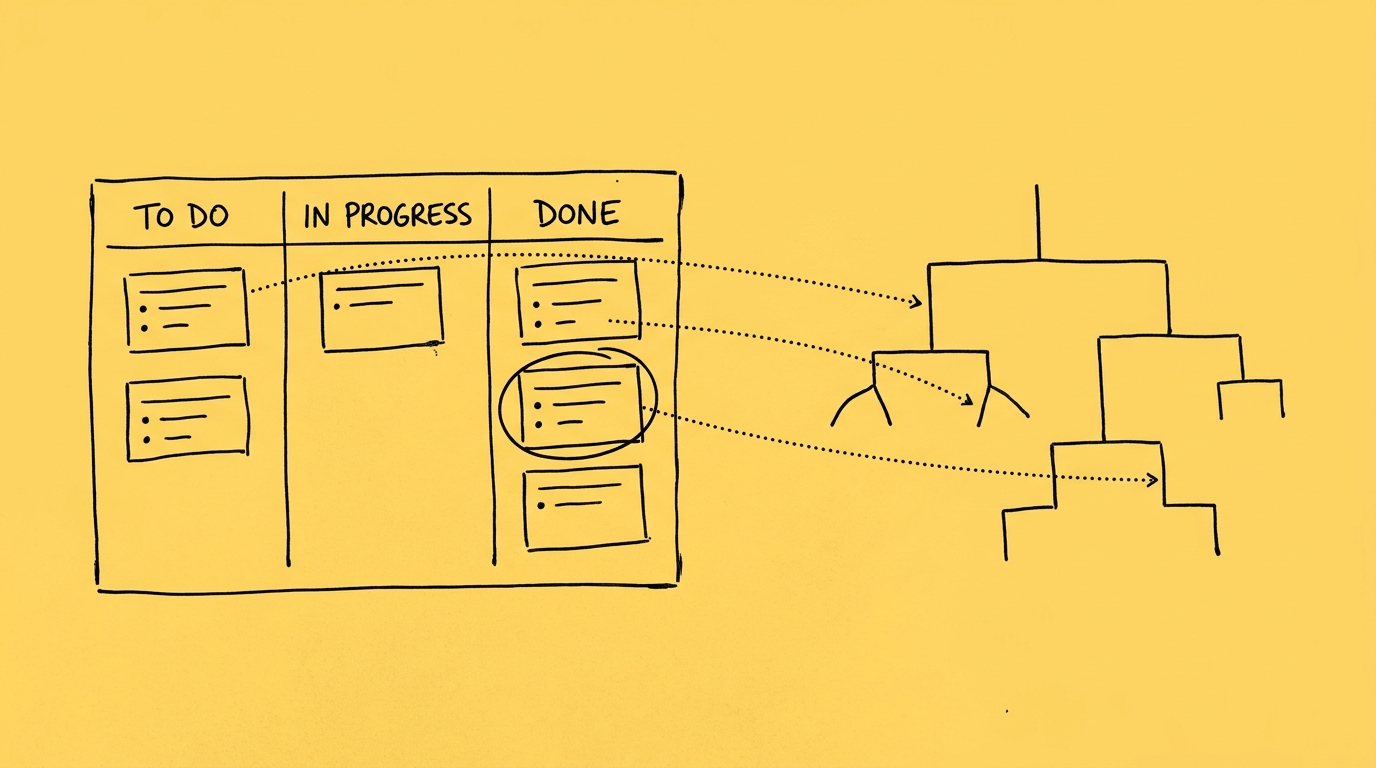
In our last AI for leaders webinar, Luís gave Claude Code two files: a client brief for a new project and the retrospective from our last project with that client. Before it built anything, the kickoff skill checked the brief against kickoff requirements and found gaps and conflicts. It asked Luís every open question in one batch, each with a proposed answer. He accepted most of them and rejected the go-live date because it clashed with a constraint in the brief. A few minutes later, he built a kickoff deck and kickoff workbook from our templates, with Trello cards ready to create. Building that pack by hand usually takes us a day.
That was the first of three live demos. All three cover the same half of a project manager’s week: preparing and collecting information. That means status updates, reports, dashboards and keeping track of every initiative. The other half of the week, coordinating and deciding, stays with the project manager. We are not the only ones working on this. The Association for Project Management reported in March 2026 that 27% of UK project professionals already use AI, mostly to summarise documents and prepare reports.
What are the three levels of AI adoption for project managers?
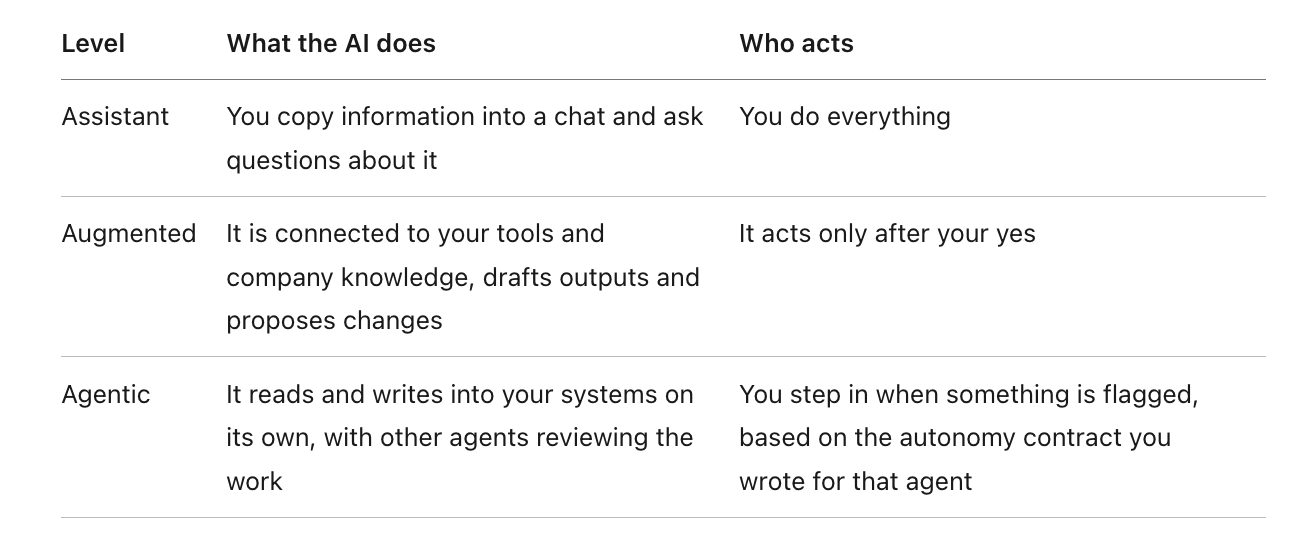
The demos show the move from assistant to augmented. That move happens through skills. A skill is a saved set of instructions that uses your templates and rules, so the AI follows them every time instead of only when you remember to write a good prompt. Some of the workflows Luís runs on his own machine already work in agentic mode.
Demo 1: how can AI prepare a project kickoff?
The kickoff skill reads the client brief and the closure notes from past work with that client. The brief in the demo had the usual parts: background, objectives, scope, timeline, budget, risks and next steps. All the data was fictional.
The skill then does four things. It checks the brief against what a kickoff needs. It lists gaps and conflicts, for example, a rule in the proposal about when results get released, where it suggested waiting for human validation first. It asks all the open questions at once with a default answer for each. Then it builds the pack: a plan with milestones, a risk analysis with first actions, the stakeholders, and a deck on the Whitesmith template with goals, scope (what’s in and what’s out) and timeline.
Beyond the time saved, we catch gaps before the kickoff meeting instead of three weeks into the project. The project manager still reviews everything. What goes away is the mechanical part of building decks and workbooks.
We use Trello because that’s our tool. The same skill works with Jira, Notion or Linear with small changes, and with your own templates instead of ours.
Demo 2: how can AI prepare you for a client meeting?
Before each weekly sync with a client, the meeting prep skill reads the meeting notes, call transcripts, email threads, the project workbook and every Trello card with its comments. It writes a one-page briefing with:
- what changed since the kickoff
- decisions needed, each with a proposal
- what’s overdue today and what’s due Friday
- the board compared with reality
- risks, a suggested agenda and three questions to ask
It also offers to chase specific people for missing information. This replaces an hour or two of reading cards, often cards you already read yesterday and just need to confirm.
The skill also checks the board against the other sources. If a card says “done” but GitHub shows the pull request isn’t merged, it flags it. If last week’s notes say a decision is pending but a card comment says it was made, it flags that too. Luís wrote about how he built this habit across three clients in [How Luís turns a client meeting into a task: link].
A second skill turns the same sources into a status document the client can read, on our template, with links to the relevant cards. Collecting those links by hand is one of the slow parts of a status report.
On access: the skills use the connectors in the project manager’s own Claude session. They only see the Trello boards and GitHub repositories that person can already see, so no other project’s data is exposed.
This demo depends on one habit. We transcribe our meetings, and we ask clients to do the same. Transcripts give agents the context they need, and they build up company knowledge you can search later when you need to confirm a date or revisit a decision.
Demo 3: how can AI keep track of a project manager’s week?
Luís’s week tracker is one private page per week. It lists the Trello cards by list, the meetings, and three task lanes: one for him, one for Claude, and one for the client. Anything where the sources disagree shows in red. In the demo, a card due last week was still in “this week” with no comment explaining the delay, and a pull request had been closed while the card status said otherwise.
He runs it daily, so it stays current. It reads the code, not only the board. That changed his work more than anything else: he no longer asks developers “is this card up to date?” or “was the pull request merged?”. They don’t have to stop and switch context to answer him, because the agent can find the answer in GitHub.
The tracker also says what it couldn’t read. In the demo, it flagged that his email wasn’t connected and that the notes from one sync meeting were missing from Drive, so he could see the picture was incomplete instead of trusting it.
Maria runs a different tracker for her own week, which is the point: each person can shape it around how they work. Hers also has a section for work Claude can do, such as making sure a change in a Google Drive document also reaches GitHub, Jira or Confluence.
What we learned rolling these skills out
Better inputs give better outputs: inputs here mean company knowledge, past projects, templates and standard procedures. The knowledge doesn’t need to be well organised. The real blocker is when it doesn’t exist in writing at all, because it lives in people’s heads.
Training alone doesn’t drive adoption: we pair a short session on the tool (using Cowork or Codex at work is different from using ChatGPT at home) with setup skills that check every connector a skill needs is in place. When the first run works, people keep using it. We also run office hours for people who need more help.
Skills carry the company’s best practice: in a recent pilot with a client that has hundreds of project managers, everyone worked differently: some tracked projects in Excel, some documented in Confluence, some used OneDrive, some used Jira and some didn’t. The skills let each person keep the way they work, while the outputs followed the company’s templates and Jira, the company’s source of truth, stayed up to date in the background.
In that pilot, 60% of the project managers made only small edits to the outputs, mostly wording and rephrasing. Getting the AI to write like your team still takes work. Project managers estimated they saved between 1 and 5 hours per project per week, depending on how many projects they ran and what stage each was in.
How does the project manager role change?
Time moves from compiling to deciding, from chasing to aligning, and from doing to reviewing. At Whitesmith, we now spend around 80% of our time reviewing work our agents produce.
Three skills matter more in that setup. First, knowing what good looks like and noticing when something is off. Evals help check outputs, but the judgment stays with people. Second, deciding what the AI can do alone and what it must ask about first, and writing that down as an autonomy contract before any agent writes into your tools. Third, bringing your team and stakeholders along while the way of working changes.
Questions from the webinar
What tools do these workflows run on?
Luís ran the demos in Claude Code. Maria uses Claude Cowork for most of her work and keeps the same or similar skills in ChatGPT Work. The skills also move to Codex. In the demos, the connected tools were Google Drive, Trello, Google Calendar, GitHub and Granola (for transcripts), but Jira, Confluence and Linear work too.
The tool matters less than two things: your knowledge and your connected tools. With those in place, you work through one conversation instead of ten open tabs.
Our project managers all work differently. How do you get the whole team using it, not just the enthusiasts?
Skills don’t depend on who runs them. They carry the practices the company agreed on: what the template looks like and what good output looks like. That lowers the bar for everyone. After that, the strongest argument is the time saved. It also helps to know why people hold back, because the reasons differ. Some doubt the AI will produce good work, and better company knowledge and templates answer that. Others worry about their job, or feel overwhelmed by how much is changing. Each reason needs a different response.
What if a client asks for AI, but the real problem is the process?
Often, the first step is writing the process down, because in many companies it exists only in people’s heads. Once it’s written, you can see where time goes and how often each task repeats, and then choose: improve the process with AI, or redesign it with AI built in from the start.
One example: a client’s project managers filled in a status report in a spreadsheet, with coloured cells and triangles in specific places, then copied it into PowerPoint. It was hard for people to edit and hard for agents too. We redesigned the template first, so both people and agents could read and edit it.
How do you stop the AI from getting things wrong when it writes into your tools?
Start in augmented mode, where a person reviews every output before anything is written. Pick a process you repeat every week or every day, with a known template and a quality bar you can check. Run it for one to three weeks and tune the skill. Only then move it towards agentic mode. Add evals as well: rule-based checks that confirm each output covers every section, and agents that cross-check each other’s work.
We used the same approach for security review, with agents that try to disprove each other’s findings before a person sees them: how we run security review on every pull request with agents.
Where to start
-
Pick one output you produce every week, such as the status report or the meeting briefing.
-
Write down how you make it today, and collect the template and a few past examples.
-
Connect the tools it reads from and turn your best prompt into a skill.
-
Review every output for a few weeks before you let it write into your tools on its own.
Watch the full recording: here
Our next webinars in November cover agentic QA in the software development lifecycle and AI employees: agents working as roles inside an organisation.
If you want to see where these workflows fit in your team, book a call with us!


Webinar: November 11
QA in an agentic SDLC
QA in an agentic SDLC
Free webinar - November 11
