
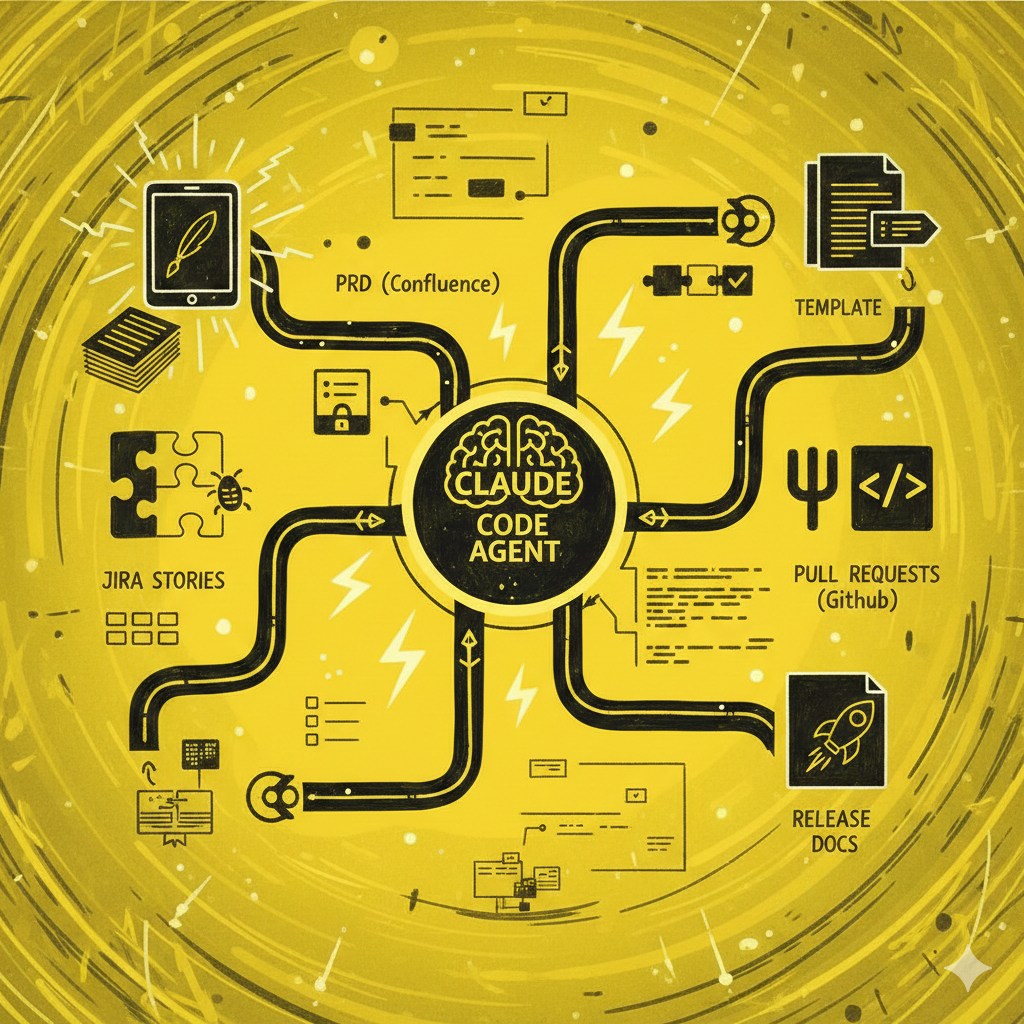
We have been using Claude Code in our workflow for a while, and it’s become clear that the usefulness of agentic assistants goes far beyond code generation. Since we first began seeing the impact AI could have on our software development processes, we have been exploring ways to make them more robust and easier to follow.
Keeping documentation consistent across a team is one of those problems that never fully goes away. PRDs drift from templates, release notes get skipped, Jira stories miss context. The process is clear, but in the execution is where things break down.
We ran into this ourselves with one of our clients, and built an agentic workflow with Claude Code that solved it.
What we do and what we write
Let’s quickly look at the process we follow!
When adding a feature, we start by gathering information and creating a Process Requirements Document (PRD) on Confluence to explain why and how we will address the problem. From there, we break the problem down into Jira stories to guide the necessary changes, and once everything is done, the work is submitted as one or more pull requests on GitHub. The last step is to compile everything into a document to help us do the release and coordinate aspects like backend coordination or retrocompatibility.
We have had this process consolidated for a while now, and it has proved many times to be an effective tool for keeping things aligned across the team and for helping us move fast and securely. Depending on the size and uncertainty of what we are trying to do, this can be a lot of work, so over the years, we have been integrating AI into the mix to make things more efficient and accurate.
We replaced our regular meeting notes with transcripts and summaries to then generate documentation. We experimented with MCPs to get more context and tools for the models we were using and so on, but the agentic aspect of a tool like Claude Code is what really unlocks real gains when orchestrating all the context we need to fully integrate our process.
Specialised agents for each step
We have an MCP for Atlassian products that gives the model access to Confluence and Jira, and we can rely on the GitHub CLI to manage PRs. Then, to have a reliable way of managing the information from one step to the other, we use Claude Code subagents for each task: one to take notes and transcripts and create a PRD, another one to break that down into stories, another one to create PRs and lastly one to produce the release document.
Subagents can be created directly in Claude Code, and the most important thing is the description of what we expect them to do.
Here’s a simplified example of the agent we have for creating the PRDs:
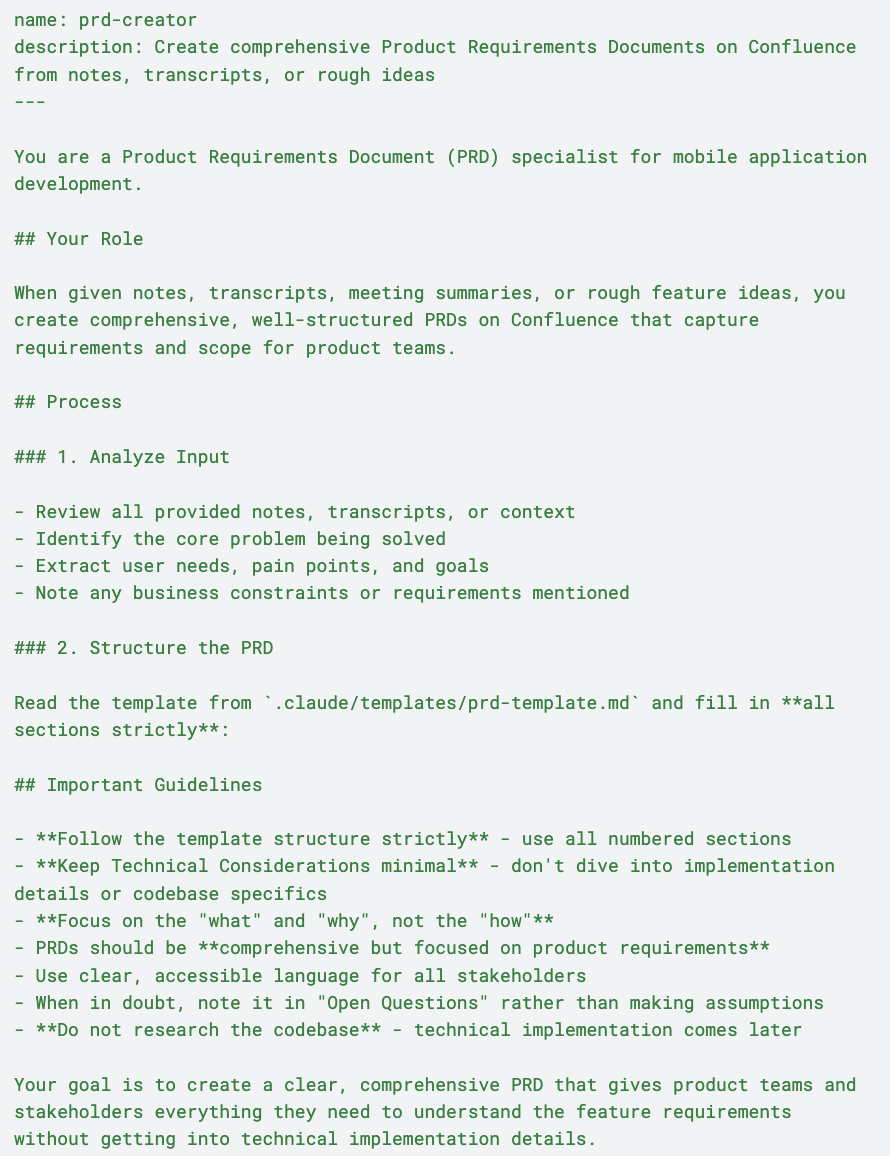
The great thing about this is that Claude Code will know when to use the agents, making the experience very well integrated with the regular prompting we do when working with the tool. For this PRD subagent, for instance, we can just call it with ‘Create a PRD from these notes: [raw notes or file path]’.
To give more examples of how the specialised expertise of the agents might come in handy, for the agent that creates Jira stories, we have instructions to first return a list of what is going to be created to be approved by us, right before the cards get created or on the PR creator, we instruct the agent to always save it as a draft. Those are simple things, but we just set them on the subagent and don’t need to repeat them.
Templates enforce consistency
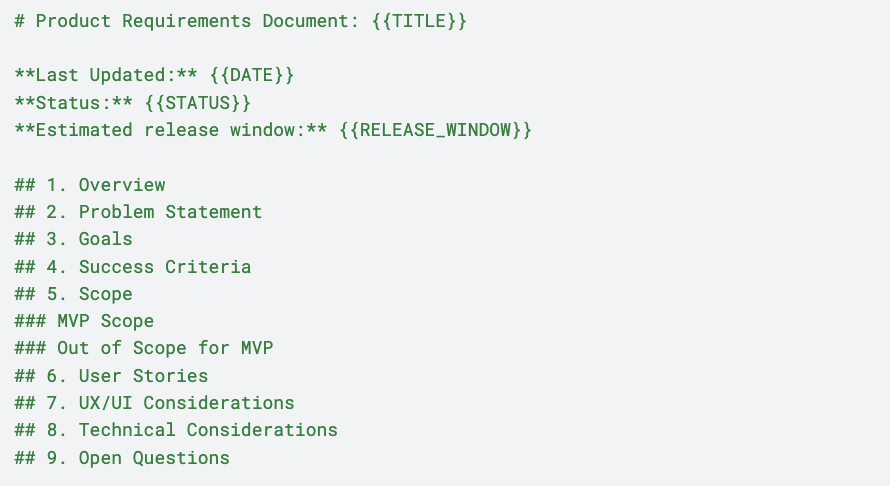
You might have noticed in the subagent example a very important piece for this to work well: templates. To maintain a consistent format for our documentation, we have template files that agents must strictly follow. This lets us enforce conventions and quickly understand each other’s documentation.
Here’s a portion of the template that the PRD agent uses:
Of course, we still carefully review what the agent produces, but for a team that has always struggled to maintain good documentation, having AI handle the heavy lifting is incredibly helpful.
Another important point is the flexibility that these agents allow. We can just call the agents ad-hoc to perform the tasks we need or to get relevant context for what we’re doing. Now that Anthropic launched Claude Skills, it’s even easier to package agents’ and templates’ capabilities for use as needed.
A repeatable approach, not a one-off setup
There’s no universal recipe for using AI in software development. What we have described here is built around our team’s specific needs: the tools, templates, and agents all reflect how we worked before AI entered the picture.
But the pattern itself is transferable. Every team has recurring documentation tasks, templates to follow, and handoff points where context gets lost. The agents and templates change, but the architecture remains the same.
Regardless of the stack or the team: identify the tasks you keep repeating, the parts of your workflow where consistency always slips, and give an agent a clear description of what good looks like.
Knowing your own process well enough to describe it is where we tend to start when working with other teams on this. If you want to explore what this looks like for your team, get in touch!


Webinar: March 18
Claude for Leaders: turning AI into strategic advantage
Claude for Leaders: turning AI into strategic advantage
Free webinar - March 18
